The short answer
Turnitin compares the text of a submitted paper with its database of web pages, publications and past student papers, then reports the percentage that matches in a Similarity Report. It does not decide plagiarism. Instructors review the matches, and a separately licensed AI writing indicator can add a second, independent score.
What is Turnitin and what does it do?
Turnitin is a text-matching service that schools and universities license so instructors can compare student submissions with a very large database. Its core output is the Similarity Report, which highlights the passages in a paper that match other sources and shows an overall percentage. Turnitin's own product page describes the report as a way to compare student work against student submissions, premium publications and more than 20 years of internet content.
It is a tool for the instructor, not a judge. Turnitin's help center says Turnitin does not check for plagiarism and does not define whether a paper has been plagiarized. The instructor, as the subject-matter expert, decides whether the matches are legitimate citation, poor paraphrasing or plagiarism. A 2019 paper in the Saudi Journal of Anaesthesia makes the same point: the similarity index is not a plagiarism index, and no percentage is characteristically good or bad.
How does a paper reach Turnitin in the first place?
Students usually do not visit Turnitin directly. An instructor sets up an assignment, often inside the school's learning management system, and the student uploads the file there. Our guide to how Canvas and other platforms connect to AI detection shows how those integrations pass the report back to the instructor.
The instructor's choices matter from the first click. The assignment settings decide which databases the paper is compared against, whether the paper is stored for later comparisons and when the report is generated. That is why two schools can get different results for the same essay.
What happens to your paper after you submit it?
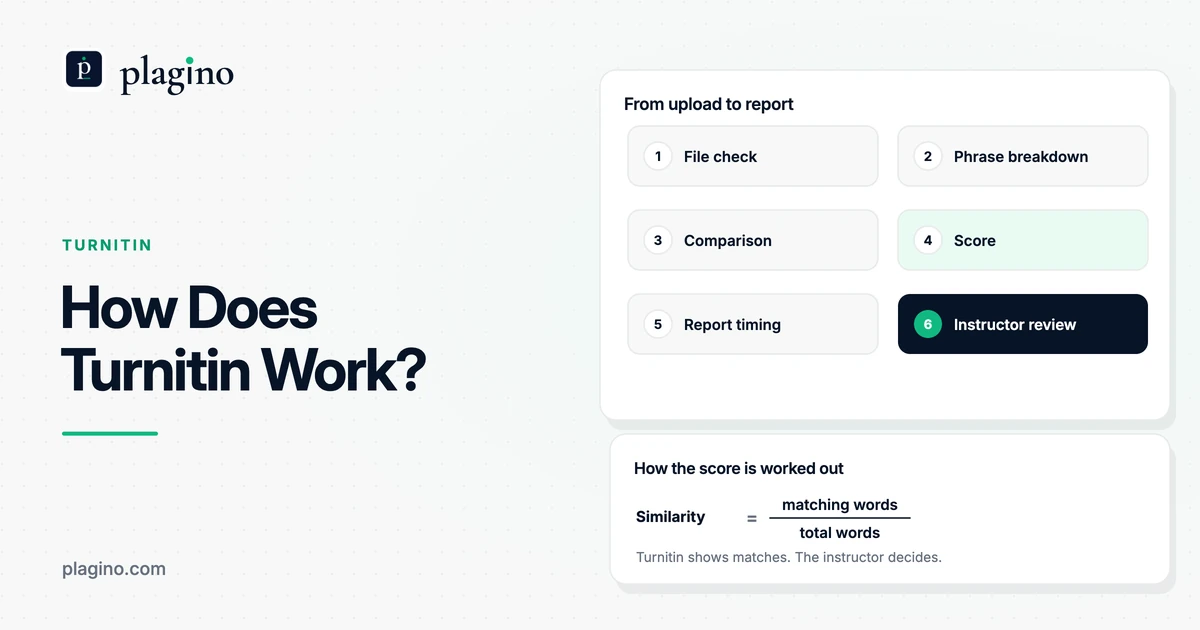
Your file is checked against the file rules, broken into phrases, compared with the databases the assignment uses, scored and turned into a report for your instructor. The table follows that path using Turnitin's own guides. As of October 2026, some of the process descriptions come from Turnitin's marketing blog, and the large database figure is a vendor claim that we have not verified.
| Stage | What happens | Who controls it |
|---|---|---|
| 1. File check | Turnitin needs readable text. For assignments that accept only checkable files, the file must be under 100 MB and 800 pages, with at least 20 words, in a supported format. PDFs need selectable text, so scanned images are rejected. | The instructor's file-type setting |
| 2. Phrase breakdown | Turnitin says it breaks the text into phrases, gives each phrase an ID and leaves out common words such as "and" or "the". | Turnitin |
| 3. Comparison | The phrases are compared with the search targets chosen for the assignment, which can include web pages, publications and previously submitted works. Turnitin says it uses natural language processing and strict matching to limit false positives. | The instructor's repository and search-target settings |
| 4. Score | The overall similarity is the number of matching words divided by the total words in the document. | Filters and exclusions set by the instructor |
| 5. Report timing | The report can be generated immediately or on the due date. A final check after the due date compares everyone's work, so a score can change. | The instructor's report-generation setting |
| 6. Review | The instructor reads the highlighted matches and decides whether they are acceptable. | The instructor and the school's policy |
The file rules come from Turnitin's file requirements guide, and the scoring steps from its Similarity Report overview. The phrase description and the "seven trillion possible matches" figure come from a Turnitin blog post from August 2024, so treat that number as marketing, not a measured fact.
The timing row matters if you resubmit. Turnitin's similarity score guide says a final check across all submitted assignments after the due date lets it spot copied work submitted by someone else, such as when a classmate hands in your paper first. For that check to run, papers must be added to a repository and reports must generate immediately (with overwrites allowed until the due date) or on the due date.
What does Turnitin check your paper against?
Turnitin checks your paper against the sources your instructor selects, which can include billions of current and archived web pages, a repository of earlier student papers and thousands of periodicals, journals and publications. Turnitin's overview says the comparison uses the databases selected for the assignment, so the check is not the same everywhere.
When the same words match more than one source, the report shows a top source first. The overview lists the order of priority for identical matches as internet, then publications, then submitted works. That means a phrase that also sits in an old student paper can still be shown as an internet match.
Does Turnitin keep a copy of your paper?
It depends on the repository setting. Turnitin's student guide warns that if you submit several drafts of the same paper to your institution's private repository, your final draft can score 100% against your own earlier draft. Turnitin advises submitting only the final draft to that repository.
For AI detection, Turnitin says there is no separate AI repository and that customers choose whether student papers join the repository. Customers can also request full deletion of their submissions, though not deletion of just the AI component. Ask your instructor or your school's privacy page what applies to your course.
Does Turnitin check work in other languages?
A university library guide says it does. The University of Pretoria library's explainer, dated February 2026, says Turnitin detects the language of a non-English document and translates it into English for comparison. That is one university's description, so check Turnitin's current documentation or ask your institution before relying on it.
How do you read the Turnitin similarity report?
The Turnitin similarity report shows an overall percentage, your text with every match highlighted, and a list of sources behind those highlights. The percentage is the share of your words that match other sources, not a measure of how much you copied. Turnitin's overview says highlighted matches are instances of text similarity and do not always indicate plagiarism, because a match could be a quote or a bibliography entry.
The newer report sorts matches into four groups by whether the text is quoted and cited, and it uses source cards that show the matched percentage and the number of matching blocks. It also has a flags panel that points to text manipulations such as replaced or hidden characters, which Turnitin describes in its August 2024 update. Our guide to the Turnitin similarity score walks through what percentage is acceptable and how filters change the number.
What does green on Turnitin mean?
Green on a Turnitin report icon is a similarity band, not a verdict. In Turnitin's default Feedback Studio scheme, green means one word up to 24% matching text, and blue means no matching text. Turnitin's instructor guide lists a second scheme for Similarity and SimCheck, where green means 0% and blue means 1-24%, so the same color can mean different things depending on the product.
A green icon therefore says the amount of matching text is in the lowest non-zero band, and nothing about whether the matches are properly cited. Our page on what green on Turnitin means compares the default bands with the schemes some universities publish.
How does Turnitin's AI detection work, and is it separate?
Turnitin's AI writing indicator is a separate check that sits inside the same report. Turnitin's AI writing FAQ says it is available when a school licenses Turnitin Originality, that admins can switch it off and that its percentage and the similarity score are completely independent and do not influence each other.
The method works on probability, not matching. Per the FAQ, sentences are grouped into overlapping segments, each segment gets a score between 0 and 1 for how likely it is human or AI written, and each qualifying sentence takes its segment's score. Overlapping scores are pooled and combined into the document percentage. Turnitin explains that language models tend to pick likely next words, while human writing is more inconsistent, and its classifiers are trained on those differences.
What are the limits of the AI indicator?
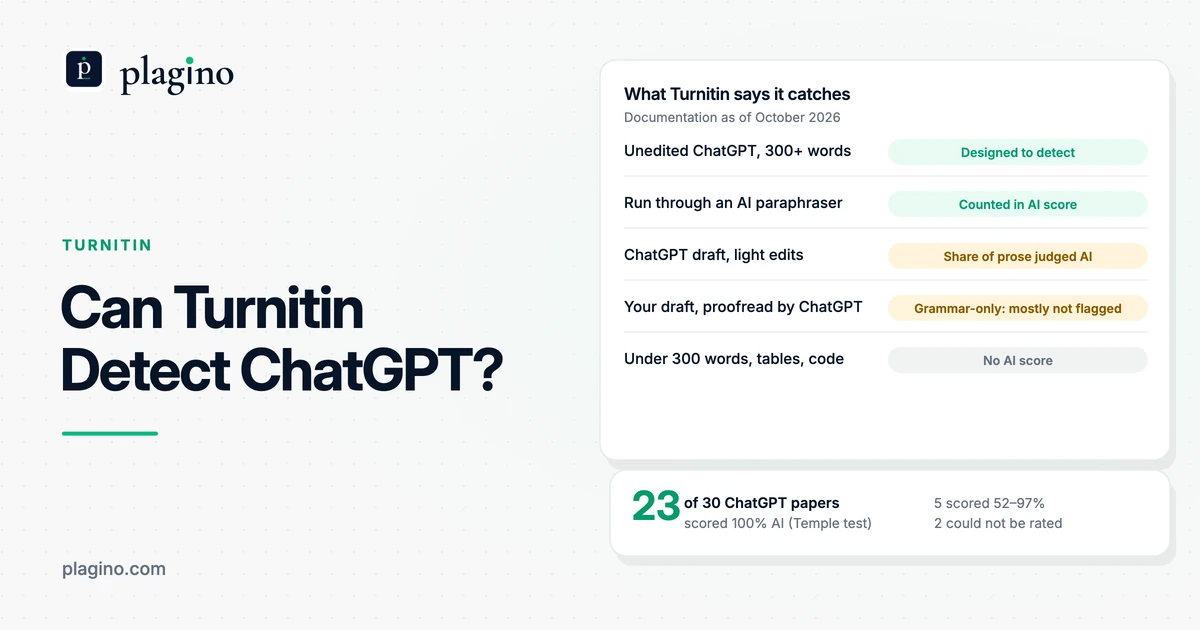
The FAQ says the model analyzes prose sentences in long-form writing, and an English submission needs at least 300 words of prose to produce a report. Lists, bullet points and code are not reliably covered. In short documents the prediction is mostly all or nothing, because there is only one segment and nothing to overlap, so a mixed text can be flagged as entirely AI.
Turnitin targets a false positive rate below 1% for a document, but that is its own claim. In Plagino's March 2026 benchmark of 1,000 documents (500 AI-written, 500 human-written), Turnitin's AI detection caught 98.2% of the AI-written documents and wrongly flagged 1.4% of the human-written ones. The full table is on our benchmark page. Our guide on whether Turnitin detects AI covers the models it lists and the asterisk shown for low scores.
How do similarity, AI detection and Clarity differ?
Turnitin can run up to three different checks on the same assignment, and each one looks at something different. People often blur them into one "Turnitin score", which is why a student can see a similarity percentage and still be unsure what the instructor sees. The table separates them, using Turnitin's documentation as of October 2026.
| Check | What it examines | What the instructor sees | Needs |
|---|---|---|---|
| Similarity | Whether passages match web pages, publications or earlier student papers | An overall percentage, highlighted matches and source cards | A Similarity-type license and the assignment's search targets |
| AI writing indicator | The likelihood that prose sentences were written or modified by an AI tool | A separate AI percentage and report highlighting segments | Turnitin Originality, with the feature switched on by the admin |
| Clarity writing record | How the document was edited inside Turnitin's own writing space | A version history with paste, copy and cut events and active time | A Turnitin Clarity license, and an assignment set up in its writing space |
Turnitin's Clarity FAQ for students says the writing space records insertions, deletions, paste events, copy and cut events and active time, and that this report is visible to instructors on submission. It also says activity outside the writing environment is not captured and that the space is not a proctoring environment. Clarity is a separate Turnitin product with its own page, so an ordinary file upload does not produce this record.
That also answers a worry students raise: a normal Similarity check works on the text of the file you upload. Turnitin's guides describe a comparison of that text with its databases. They do not describe it reading your browser history or open programs.
Who sees what: student, instructor or admin?
Instructors and admins see the most. A student sees the similarity score only when the instructor allows it, and does not see the AI indicator at all unless the instructor shares a PDF. The table sets this out so you know what to ask your instructor.
| Result | Student | Instructor | Admin |
|---|---|---|---|
| Similarity score and report | Only if the instructor allows it, and once the report has generated | Yes | Controls the product settings |
| AI writing indicator and report | No. An instructor can download and share the PDF | Yes, if the feature is on | Can switch the feature on or off, and can see the indicator |
| Clarity version history | The student knows it is recorded | Yes, on submission | Not stated in the guide we read |
If your similarity score is missing, Turnitin's student guide gives two reasons: your instructor turned off student access to the report, or the report is still being generated. If you are a teacher setting this up, our page for instructors using Plagino explains how an independent second opinion fits in.
What can Turnitin not tell you?
Turnitin cannot tell an instructor why a passage matches, whether a source was cited well enough or who wrote the paper. A high score is not proof of plagiarism, and a low score is not proof of originality. Turnitin's similarity score guide gives both cases, and its help center says a human review is always required.
The database also has limits. The Saudi Journal of Anaesthesia paper notes that plagiarism detection tools cannot catch every occurrence because their databases are not complete. The AI indicator has its own limits, explained above, and an AI percentage is not the amount of text in the paper. If a result looks wrong to you, our guides on AI detector false positives and on being falsely accused of using AI explain what evidence helps.
What should you do with this before you submit?
Use what you now know about the process to remove surprises. These steps follow Turnitin's guides and keep the focus on honest, well-cited work.
- 1
Ask which checks are on. Ask your instructor whether the assignment uses Similarity only, or also the AI writing indicator or Clarity, and whether you will see your own report.
- 2
Check the file. Use a supported format such as .docx or a PDF with selectable text, keep the file under 100 MB and 800 pages, and avoid password protection.
- 3
Cite as you write. Quote and cite every source in the style your course uses. Turnitin says quoted text still shows as a match, so correct citations make the matches easy to read, not invisible.
- 4
Submit your final draft once. Ask whether the course stores papers in a private repository. If it does, submit only the final version, because earlier drafts can match your final one.
- 5
Read the matches, not just the number. Open each highlight and sort it into a quote, a reference, template text or an uncited passage, then fix the uncited ones and talk to your instructor about anything that looks wrong.
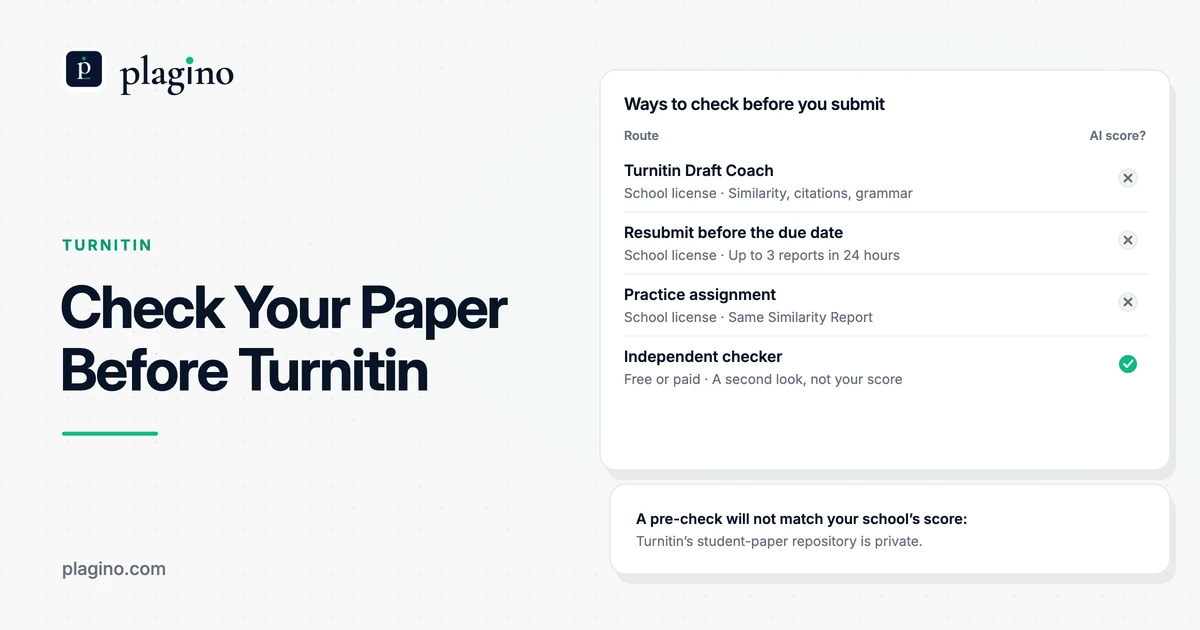
A public checker can help you look at a draft before it is submitted, but it will not reproduce your school's Turnitin result. Plagino's plagiarism checker compares your .docx with open-access academic papers and does not see Turnitin's private student-paper repository. Plagino has not benchmarked its plagiarism percentage against Turnitin's similarity score. You can run the separate Plagino AI detector on a draft to see which passages read as AI-written, or read our list of alternatives to Turnitin if your school does not give you access.
Frequently asked questions
How does Turnitin work in simple terms?
Turnitin compares the text of your paper with its database of web pages, publications and earlier student papers. It highlights the matches and shows the percentage of matching words as a similarity score. Your instructor then reviews the matches and decides whether they are acceptable.
What is Turnitin used for?
Schools and universities use Turnitin to give instructors a report of text that matches other sources. The instructor uses it to check citations, paraphrasing and possible plagiarism. Turnitin says the report supports the instructor's judgment and does not decide misconduct.
Does Turnitin check for plagiarism?
No, not by itself. Turnitin states that it does not check for plagiarism and does not define whether a paper has been plagiarized. It finds matching text, and the instructor decides whether the matches are legitimate citation, poor paraphrasing or plagiarism.
What does Turnitin check my paper against?
It checks against the sources your instructor selects for the assignment. Turnitin lists billions of current and archived web pages, a repository of earlier student papers and thousands of periodicals, journals and publications. Settings differ between schools, so results can differ too.
How does Turnitin calculate the similarity score?
It divides the number of matching words by the total words in the document. Quoted and referenced text still counts as a match. Instructors can apply filters, such as excluding the bibliography or small matches, and those settings can change the percentage.
How long does Turnitin take to generate a report?
Turnitin does not publish one fixed time. A report can generate immediately or on the due date, depending on the assignment setting, and Turnitin's student guide says a score may be missing because the report is still generating. If a final check runs after the due date, the score can change.
Does Turnitin detect AI writing?
Only if your school licenses Turnitin Originality and the admin has switched the feature on. The AI writing indicator is a separate score from the similarity percentage. It is visible to instructors and admins, not to students.
Does Turnitin see my browser history or other programs?
Turnitin's guides describe a comparison of the text you submit with its databases, not a view of your browser or computer. The exception is a Clarity assignment, where the writing space records edits, paste events and active time inside that space. Turnitin says Clarity does not capture activity outside its writing environment.
Does Turnitin keep my paper after I submit it?
It can, depending on the repository setting chosen for the assignment. Papers added to a repository can match later submissions, including your own earlier drafts. Ask your instructor which setting the course uses.
Why is my Turnitin similarity score high when I cited everything?
Because Turnitin highlights quoted and referenced text as matches. Quotes, reference lists, template text and common phrases all count toward the percentage. Ask your instructor whether they can exclude quotes, the bibliography or small matches.
Does Turnitin work on non-English papers?
It can process other languages, but the details vary by feature. Turnitin's AI writing detection lists a set of supported languages, with paraphrase detection limited to English. A University of Pretoria library guide also says non-English similarity checks are translated into English for comparison, which is one university's description.
Can I see my Turnitin report before my instructor does?
Only if your instructor lets you. Students see a similarity score when the instructor allows student access and the report has finished generating. The AI indicator is not visible to students.
Is Plagino the same as Turnitin?
No. Plagino is an independent AI detection and plagiarism checking service and is not affiliated with Turnitin. Its plagiarism check compares your document with open-access academic papers, so its percentage will not match your institution's Turnitin score.